JWST Filling Out the APT Proposal Form
This page provides a walk through of the various parts of the Astronomer's Proposal Tool (APT), the software through which JWST proposals are developed and submitted.
On this page
See also: JWST Astronomers Proposal Tool Overview
APT software can be downloaded from the APT software page; version 2026.5.1 (or later) is required for Cycle 6 submissions. Additional information about APT can found at JWST Astronomers Proposal Tool Overview.
As described in JWST Getting Started on Your Proposal, a proposal consists of a completed APT proposal form and an attached PDF file. This article describes the items that must be filled out in the APT proposal form; this information is also available from the context-sensitive help in APT. Not every item described here needs to be filled out for every proposal. For example, some items are only relevant for observing proposals, while others are only relevant for archival proposals. APT will automatically let you know which items need to be filled out, depending on which proposal type you choose. JWST Preparing the Proposal PDF Attachment describes the items that must be addressed in the attached PDF file. If there is a discrepancy between the APT form and what is written in the "Description of Observations" of the PDF attachment, the APT form takes precedence. In other words, proposals are reviewed based on the information in the APT form.
Proposal Information form
The following items are found on the APT Proposal Information form.
Title
The title of your proposal should be informative, and must not exceed two printed lines. Please use mixed case instead of all upper case.
Abstract
Write a concise abstract describing the proposed investigation, including the main science goals and the justification for requesting observations or funding from JWST. The abstract must be written in standard ASCII (no LaTex formatting) and should be no longer than 1,700 characters (including spaces). This limit is enforced by APT.
Category
Select one of the following categories:
• GO—General Observer proposal
• Survey—Survey proposal
• AR—Archival Research proposal
Proposals for Director’s Discretionary Time submitted outside of the normal review cycles should select:
• DD—Director’s Discretionary Time proposal
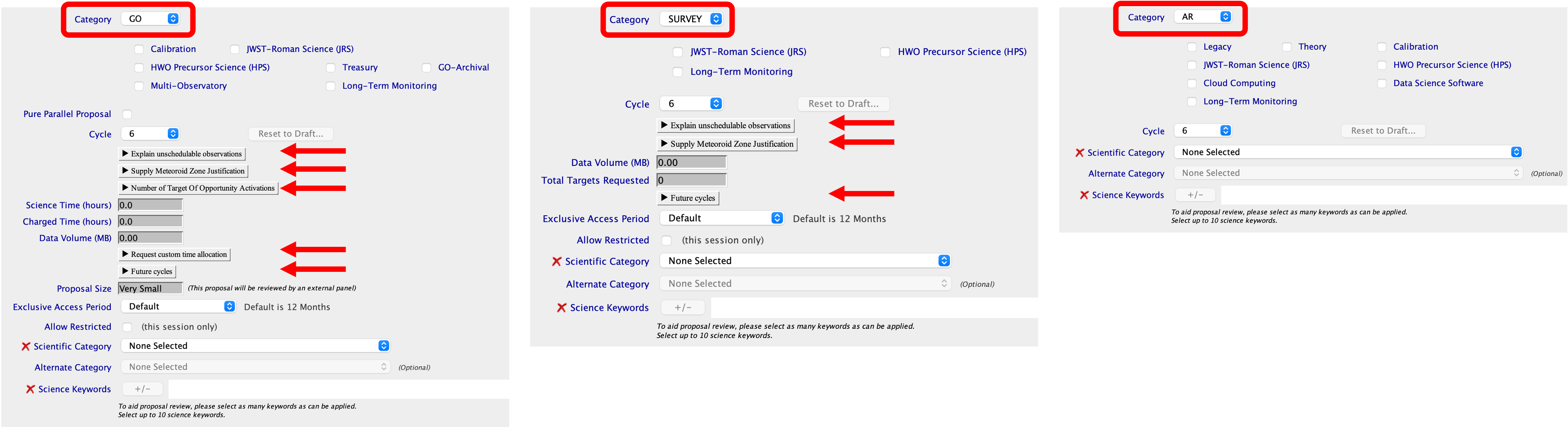
Figure 1. The APT Proposal Information form for different proposal types
Click on the figure for a larger view.
The APT Proposal Information form for GO (left), Survey (center), and AR (right) proposals, showing the applicable optional check boxes. Red arrows indicate expandable menus.
Optional check boxes
On the same line and to the right of the Category drop-down, proposers may mark the following check boxes if they are relevant to the proposal (see Figure 1). Please note that these flags come with additional requirements which must be addressed in the PDF attachment, as described in JWST Proposal Types and Categories.
Legacy
(This keyword appears in the APT form only for AR and GO+AR proposals.)
Mark this keyword if you are submitting a Legacy AR proposal.
Theory
(This keyword appears in the APT form only for AR and GO+AR proposals.)
Mark this keyword if you are submitting an AR Theory proposal.
Cloud Computing
(This keyword appears in the APT form only for AR and GO+AR proposals.)
Mark this keyword if you are submitting an AR Cloud Computing Studies proposal.
Data Science Software
(This keyword appears in the APT form only for AR and GO+AR proposals.)
Mark this keyword if you are submitting an AR Data Science Software proposal.
Calibration
(This keyword can be set for both GO and AR proposals.)
Mark this keyword if you are submitting a Calibration GO or Calibration AR proposal.
Treasury
(This keyword appears in the APT form only for GO proposals.)
Mark this keyword if you are submitting a Treasury GO proposal.
Long-Term Monitoring
(This keyword appears in the APT form for GO, Survey, and AR proposals.)
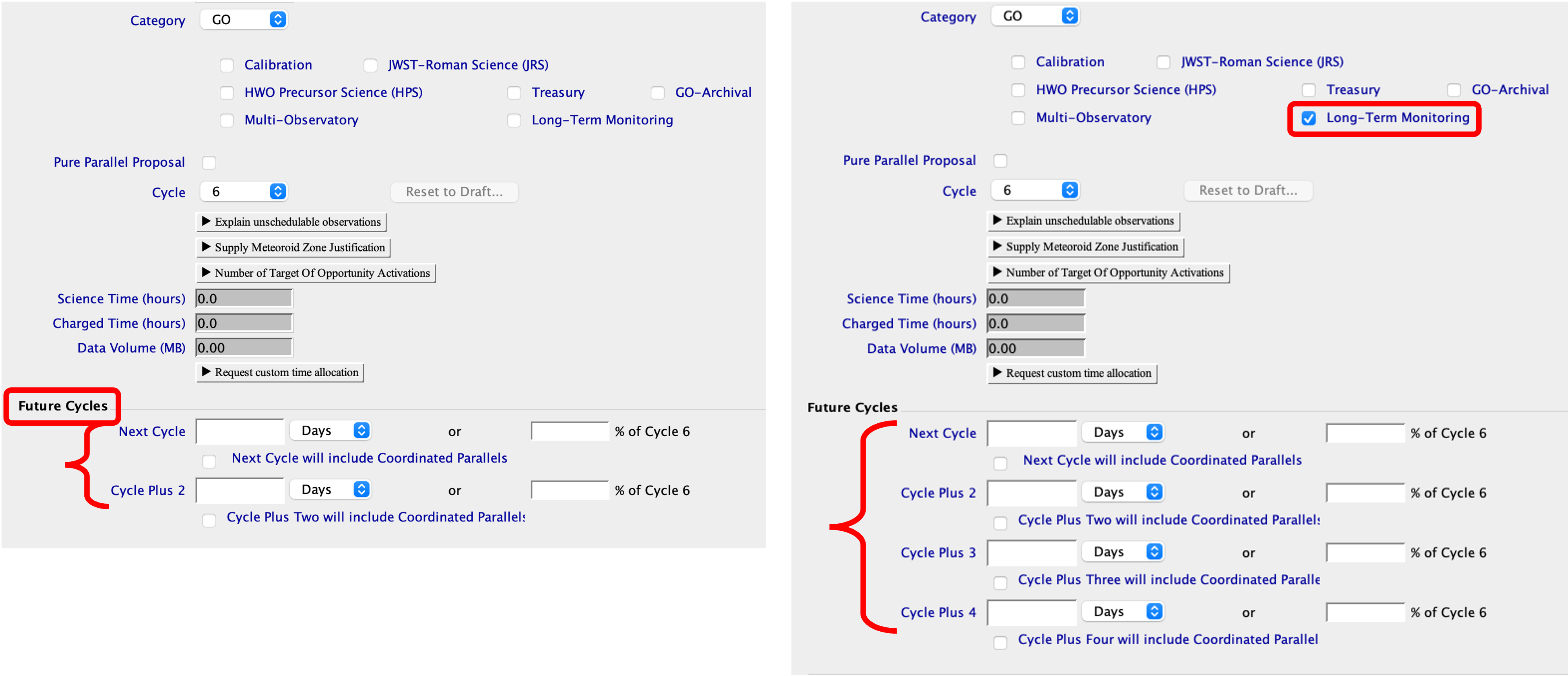
Mark this keyword if your proposal is eligible for the LTM Initiative. Once checked, observations for two future cycles beyond the default 3-cycle limit will be able to be requested (though not required; see Figure 3).
JWST-Roman Science
(This keyword can be set for all proposal types.)
Mark this keyword if your proposal is eligible for the JRS Initiative.
HWO Precursor Science
(This keyword can be set for all proposal types.)
Mark this keyword if your proposal is eligible for the HPS Initiative.
GO-Archival
(This keyword appears in the APT form only for GO proposals. Once checked, the set of keywords for AR proposals will appear.)
Mark this keyword if you are submitting a Combined GO+AR proposal.
Multi-Observatory
(This keyword appears in the APT form only for GO proposals.)
Mark this keyword if you are submitting a Joint Observing proposal.
DD Type
(This keyword appears in the APT form only for DD proposals.)
Choose the DD type from the drop-down list if you are submitting a DD proposal.
Multi-Observatory Information
(Generally, this keyword appears in the APT form only for GO proposals, except for Joint JWST-HST programs that allow both GO and DD proposals.)
Proposals with Coordinated Observations with Other Facilities should provide the requested information regarding the Partner Observatory in the "Multi-Observatory Information" section.
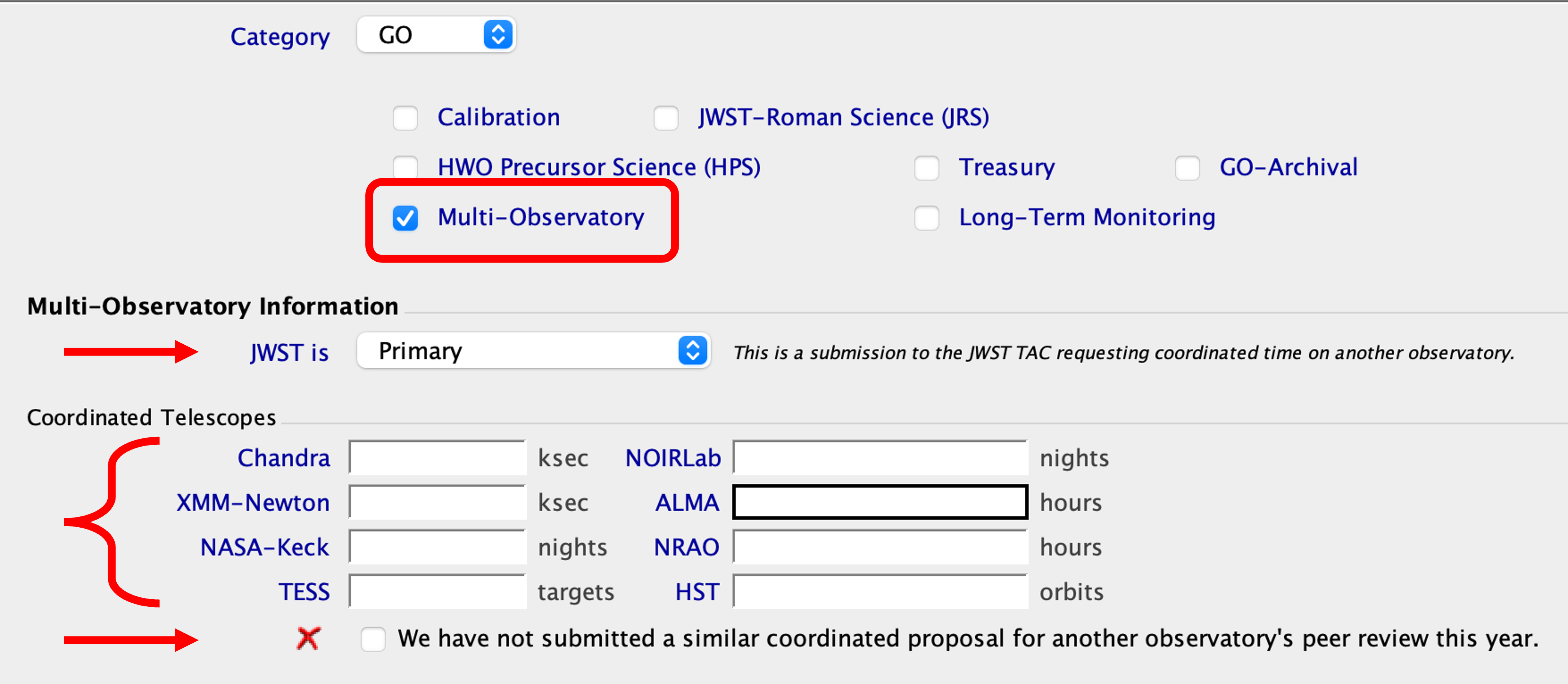
APT has a "Multi-Observatory" flag on the same line as the proposal Category (see Figure 2). When JWST is primary, you are prompted to request time on one or more coordinated telescopes. And when JWST is secondary, you are prompted to identify the primary observatory and provide the primary proposal ID.
For this Cycle 6 Call for Proposals, proposers should select JWST as "Primary."
Proposers should also check the box confirming that "We have not submitted a similar coordinated proposal for another observatory's peer review this year." This statement refers to coordinated proposals involving JWST.
Figure 2. Multi-Observatory information in the APT Proposal Information form
Click on the figure for a larger view.
The Multi-Observatory options in the APT Proposal Information form. Information must be entered in all applicable fields.
Coordinated Telescopes
ALMA Hours
If you are asking for both JWST and ALMA observing time then list the requested number of ALMA hours. You should also provide detailed information on the ALMA observations in the "Justify Coordinated Observations with Other Facilities" section of the PDF attachment. If you are not requesting any new ALMA observations, then leave that field blank.
Chandra ksec
If you are asking for both JWST and Chandra observing time then list the requested number of Chandra kiloseconds. You should then also provide detailed information on the Chandra observations in the "Justify Coordinated Observations with Other Facilities" section of the PDF attachment. If you are not requesting any new Chandra observations (or if you have Chandra time that has already been awarded), then leave that field blank.
HST Orbits
If you are asking for both JWST and HST observing time then list the requested number of HST orbits, including overheads. You should then also provide detailed information on the HST observations in the "Justify Coordinated Observations with Other Facilities" section of the PDF attachment. If you are not requesting any new HST observations (or if you have HST time that has already been awarded), then leave that field blank.
NASA Keck Nights
If you are asking for both JWST and NASA Keck observing time, then list the requested number of NASA Keck nights. You should also provide detailed information on the NASA Keck observations in the "Justify Coordinated Observations with Other Facilities" section of the PDF attachment. If you are not requesting any new NASA Keck observations, then leave that field blank.
NOIRLab Nights
If you are asking for both JWST and NOIRLab observing time then list the requested number of nights on NOIRLab telescopes. You should then also provide detailed information on the NOIRLab observations in the "Justify Coordinated Observations with Other Facilities" section of the PDF attachment. If you are not requesting any new NOIRLab observations (or if you have NOIRLab time that has already been awarded), then leave that field blank.
NRAO Hours
If you are asking for both JWST and NRAO (VLBA, VLA, or GBT) observing time then list the requested number of NRAO hours. You should then also provide detailed information on the NRAO observations in the "Justify Coordinated Observations with Other Facilities" section of the PDF attachment. If you are not requesting any new NRAO observations (or if you have NRAO time that has already been awarded), then leave that field blank.
TESS Targets
If you are asking for TESS short-cadence targets in addition to JWST observing time, then list the requested number of TESS targets. You should also provide detailed information on the TESS targets, including the required cadence, in the "Justify Coordinated Observations with Other Facilities" section of the PDF attachment. If you are not requesting any new TESS targets, then leave that field blank.
XMM-Newton ksec
If you are asking for both JWST and XMM-Newton observing time then list the requested number of XMM-Newton kiloseconds. You should then also provide detailed information on the XMM-Newton observations in the "Justify Coordinated Observations with Other Facilities" section of the PDF attachment. If you are not requesting any new XMM-Newton observations (or if you have XMM-Newton time that has already been awarded), then leave that field blank.
Pure Parallel Proposal
(This field appears in the APT form only for GO proposals.)
Mark this keyword if you are submitting a Pure Parallel proposal.
Cycle
For a Cycle 6 proposal, enter "6" (this is the default).
Expandable menus
(These menus appear in the APT form only for GO, Survey, and DD proposals.)
Make sure to mark the APT Proposal Information form appropriately using the expandable menus (see Figure 1), and provide all the requested information. If these fields are not marked and filled out in the APT Proposal Information form those requests might not be met, even if they are described in the proposal.
Explain unschedulable observations
Use this textbox to justify and explain any observations which APT deems "unschedulable."
Supply Meteoroid Zone Justification
Use this textbox to justify why observations in the Micrometeoroid Avoidance Zone are required.
Number of Target of Opportunity Activations
(This menu appears in the APT form only for GO proposals.)
For ToO observations, enter the number of Non-Disruptive, Disruptive, and Ultra-disruptive ToO activations (per cycle). Proposers should note that this number only includes the initial trigger, not any follow up observations. For more information, see the Target of Opportunity section of JWST Additional Flags for GO Proposals.
Request custom time allocation
(This menu appears in the APT form only for GO and DD proposals.)
If the time calculated by APT does not reflect the allocation needed, you can request a custom time allocation following the instructions in the JWST Observing Overheads and Time Accounting Overview.
Future cycles
(This field appears in the APT form only for GO and DD proposals.)
Please note that although this field will appear for Survey proposals, APT will not allow this field to be filled. Survey programs may not request observations in Future Cycles.
If you are requesting observations in future cycles, enter the time requests in each future cycle here. Future Cycles proposals should provide a year-by-year breakdown of the time requested using the "Future Cycles" pull-down menu where "Next Cycle" corresponds to Cycle 7 and "Third Cycle" corresponds to Cycle 8, etc. If this field is not marked and filled out, the Future Cycles request might not be met, even if it is described in the proposal. If you are submitting an LTM proposal, cycles beyond the default 3-cycle limit will appear once the Long-Term Monitoring box is checked.
The APT file should only contain the observations corresponding to the current cycle. APT files for time awarded in Future Cycles will be requested at a later time. For more information, see the Future Cycles section of JWST Additional Flags for GO Proposals.
Figure 3. Future Cycles and LTM information in the APT Proposal Information form
Click on the figure for a larger view.
The Future Cycles expandable menu in the APT Proposal Information form for Future Cycles GO (left) and LTM (right) proposals. Information must be entered in all applicable fields.
Science Time and Charged Time
(These fields appear in the APT form only for GO and DD proposals.)
APT calculates the Science Time and the Charged Time based on the observations specified in APT. The Science Time is the amount of time that the instruments spend on-sky observing targets, while the Charged Time also includes all of the instrument and observatory overheads needed to support the science observations.
Total Targets Requested
(This field appears in the APT form only for Survey proposals.)
This field is calculated automatically by APT by summing all targets associated with each example included the proposal.
Data Volume
(This field appears in the APT form only for GO, Survey, and DD proposals.)
This field is calculated automatically by APT for all observations in the proposal. For information on managing data volume, see JWST Data Volume and Data Excess.
Proposal Size
(This field appears in the APT form only for GO and DD proposals.)
The Proposal Size is determined and filled by APT based on the Charged Time (or Requested Time).
Exclusive Access Period
(This field appears in the APT form only for GO, Survey, and DD proposals.)
Enter the requested exclusive access period (formerly known as a proprietary period), of either 0, 3, 6, or 12 (months), that will apply to all observations in the program. The default exclusive access period is 0 for Large, Treasury and Calibration GO Programs, and for Director's Discretionary Programs, and 12 months for Medium, Small, and Very Small GO Programs and Survey Programs. See JWST Key Policies for more information. The benefits of or need for a non-default exclusive access period must be discussed in the "Special Requirements" section of the proposal.
Scientific Category
Specify one Scientific Category from the list below. Please adhere to our definitions of these categories. If you find that your proposal fits into several categories, then select the one that you consider most appropriate. If you are submitting a Calibration AR proposal, then choose the Scientific Category for which your proposed calibration will be most important. In general, proposals in these Scientific Categories will be reviewed by panels of the same names. However, STScI reserves the right to re-assign proposals to other categories to ensure the highest chance of the proposal being reviewed by experts with the proper expertise.
Science Category | Topical coverage | Executive Committee |
Solar System Astronomy | Proposals to observe or analyze data relevant to objects within the Solar System | Galactic |
Exoplanet Atmospheres and Habitability | Proposals related to investigating the atmospheric properties and/or chemical composition of exoplanets or related objects, through direct or indirect observations | |
Exoplanetary Systems and Dynamics | Proposals related to planet formation, including investigations of the structure and chemical composition of protoplanetary disks, and dynamical models or simulations | |
Stars and Stellar Populations | Proposals studying the physics of individual star and star clusters in the Milky Way and nearby galaxies, and investigating the global properties of the resolved stellar populations in nearby galaxies | |
Interstellar Gas and Dust | Proposals studying gas, dust and the interstellar medium in the Milky Way and nearby galaxies, including the chemical composition and interactions with winds and shocks | |
Galaxy Evolution and the Nearby Universe | Proposals investigating galaxy formation and evolution, galaxy clusters and groups, and the galaxy distribution at lower redshifts | Extragalactic |
Galaxy Frontiers and the Distant Universe | Proposals investigating galaxy formation and evolution, galaxy clusters and groups, and large-scale structure at high redshifts | |
Supermassive Black Holes and Active Galaxies | Proposals studying active galactic nuclei, QSOs, Seyfert galaxies, supermassive black holes and feedback mechanisms |
Alternate Category
If your science goals straddle two separate science categories, users have the option to add an alternate category, which provides more flexibility in where the proposal will be assigned for review. When an alternate category is chosen, APT will allow keywords from both categories to be selected, up to a limit of 10 total keywords.
Science Keywords
From the list of Science Keywords (see Appendix A - Science Categories and Keywords), please select those that best describe the science goals of the proposal. Your choice here is important. Based on the keywords that you specify, your proposal will be assigned to specific reviewers during the proposal review. Note that the proposals are graded on their in-field impact and out-of-field impact (as well as suitability & feasibility) by reviewers with expertise that closely matches that of the proposal but also by reviewers with more distant expertise.
Please give as many keywords as possible, but not more than ten. You must give at least three.
Proposal PDF Attachment
List the location on your computer of the PDF file to be attached to your submission. As described in JWST Preparing the Proposal PDF Attachment, this file should be prepared using one of the provided templates, contain all required sections, and adhere to the page limits. The entire PDF attachment must be anonymized, in accordance with the guidelines specified in JWST Dual Anonymous Peer Review.
Other sections under the proposal information
Selecting the arrow to the left of the items in the Tree Editor of APT will show subordinate sections that can be selected to enter additional information. For the Proposal Information form, this includes Proposal Description, Team Expertise, and Investigator information.
APT will not compromise the anonymous status of the proposal. It will keep Investigator, Team Expertise, and Proposal Description information from the TAC until they are requested by an authorized person to be utilized as described in JWST How Your Proposal is Evaluated.
Proposal Description
(This form appears in APT only for GO, Survey, and DD proposals.)
Describe in 1 to 2 paragraphs the observations requested in this proposal, indicating targets, instruments, modes, and any special requirements. This section should provide an overview of the proposed observations for reference by the program coordinators and instrument scientists, who will be reviewing and implementing the observations. This observing description will be publicly available for accepted proposals, unlike the "Description of Observations" section of the PDF attachment, which always remains confidential. The Observing Description in APT will not be visible for TAC reviewers. Proposers may not use that free text field as a replacement for page limit space.
Team Expertise
The Team Expertise section provides a free-format text box to enter the relevant description of the expertise, background, and roles of key team members, as they relate to the science proposed. This section should be limited in length; for most proposals, a paragraph or two will suffice. For proposals with a large number of Co-Investigators, it is not necessary to report on the qualifications of every team member, nor is it necessary to provide a bio of all team members. If proposers wish, they can identify the PI in this section.
The Team Expertise section will not be visible for TAC reviewers until after the proposal ranking is finalized during the TAC Meeting, as described in JWST Dual Anonymous Peer Review.
Please note: the box supports ASCII text. Special text markup and LaTeX characters will not show correctly.
Investigators
Principal Investigator
Enter the first and/or last name of the Principal Investigator (PI). Please use standard ASCII. Entering the first few letters (at least two) and pressing enter or tab will bring up a window containing a list of matches from our proposer database. Clicking on your entry will supply APT with the address information. For U.S. PIs, the institutional affiliation is defined as the institution that will receive funding if the proposal is approved.
If you are not in the database, click on "Add a New Investigator". If you are in the database, but the address information is incorrect, click on "Update This Address." Both clicks will take you to the MyST web page so you can be added to, or update information in, the database. Once you have entered your information into MyST, you must redo the database search and supply APT with the updated information. Proposers with "Unaffiliated Institutions" should note that the address of the Unaffiliated Institution will be ignored.
Co-Principal Investigators and Co-Investigators
Co-Principal Investigators (Co-PIs) and Co-investigators (Co-Is) can be added in APT as necessary. By default, APT will provide one blank Co-I template. Please add other Co-PIs and Co-Is or delete as necessary. There is a limit of 999 Co-PIs and Co-Is on any proposal. For each Co-PI and Co-I, enter the name and select the correct person from the list of database matches. As for PIs, requests to "Add a New Investigator" or "Update This Address" will take you to the MyST web page. For U.S. Co-Is the institutional affiliation is defined as the institution that will receive funding if the proposal is approved. Proposers with "Unaffiliated Institutions" should note that the address of the Unaffiliated Institution will be ignored.
If a proposal has a non-U.S. PI and one or more U.S. CoIs, then you must select the US Admin CoI box (in the PI form), then select one of the U.S. CoIs. This indicates which U.S. CoI will be the Administrative PI for overseeing the grant funding for U.S. investigators (see JWST Key Policies). Proposals with a US PI are optionally allowed to designate a Co-I to be the US Admin PI (e.g., if the PI is a graduate student or a postdoctoral researcher not allowed to hold a grant by their institution).
Once a program is approved, additional Co-PIs and Co-Is can only be added with prior approval from STScI.
Contact
The Contact is the person designated to receive all (non-budgetary) questions/information on the proposal and to be the official voice for the team. By default, the PI is the Contact. If one of the Co-PIs/Co-Is (or another individual) is to serve as the contact for a proposal, then the Contact keyword box should be checked. More than one Co-I may be designated as the Contact. Once designated, only the Co-Is identified as Contact may make Change Requests in an approved proposal so that conflicting requests are not made.
For Large and Treasury GO Programs, we will contact the proposer within 1-2 weeks of the submission deadline if we need to verify our understanding of the appropriate scheduling constraints. If a Co-I is to serve as the contact for this verification, then the Contact box should be set accordingly. Any person may be designated as the Contact.
Targets
(This item appears in the APT form only for GO, Survey, and DD proposals.)
JWST GO observing proposals must specify all of the proposed targets in APT.
Survey proposals only need example targets for the example observations.
See the APT Targets page for more details.
Observations
(This item appears in the APT form only for GO, Survey, and DD proposals.)
An APT observation is the basic proposal design element, consisting of one (or sometimes more) astronomical target(s) and one JWST observing mode using a corresponding APT observation template. See the APT Observations page for more details.
For Survey proposals, the proposer should enters the number of targets associated with each example observation in "Targets Requested."
APT contains data entry boxes at the exposure specification lines in each observation template where users can (at their discretion) add cross-reference information to a specific ETC workbook (WB) and calculation (CALC) ID within the workbook. See JWST APT-ETC Connectivity for more information. The ETC workbook will not be part of the review process.
Proposers are encouraged to consult Getting Started with Planning JWST Observations.
Special Requirements
Special requirements in APT are defined parameters used to constrain observation scheduling for scientific reasons, or to indicate other situations requiring specific actions. This includes specifying requirements for Aperture Position Angles (orientations). See the APT Special Requirements page for more details. All Special Requirements must have a scientific justification, discussed explicitly in the PDF portion of the proposal. The Visit Planner is the tool that helps identify if observations have been over-constrained with special requirements (that in some cases may be in conflict). Special requirements may only be added under exceptional circumstances after a proposal is accepted for execution.
Proposers should also consult JWST Observations Needing Special Requirements.
All Special Requirements must be specified in APT and justified in the "Special Requirements" section of the proposal PDF attachment. If Special Requirements are not specified in APT, they might not be met, even if they are described in the proposal's PDF attachment. See JWST Observation Specification Essentials for key items often forgotten.
Verifying special requirements
Certain special requirements can force observations into the portion of a target's visibility that is within the Micrometeoroid Avoidance Zone (MAZ). In this case, APT's Visit Planner will flag the observations. If the observations are flagged, then proposers should re-evaluate their special requirements to determine whether the observations can be made outside the MAZ. If the observations can only be obtained using the special requirements, then proposers must provide a justification in APT using the "Supply Meteoroid Zone Justification" pull down menu in the APT Proposal Information form. See the APT Micrometeoroid Avoidance article for more information.
Next: JWST Preparing the Proposal PDF Attachment