MIRI Wide Field Slitless Spectroscopy (WFSS) Template Parameters
JWST's MIRI Wide Field Slitless Spectroscopy (WFSS) imaging template, available in the Astronomer’s Proposal Tool (APT), has parameters for specifying and scheduling observations.
Introduction
Purple text indicates the parameter is Limited Access.
Boldface italics type indicates the name of an APT parameter or a value for a parameter.
 Red text indicates restrictions on a parameter.
 Black text indicates an important note.
Brown text indicates notes for the developers.
Green text indicates the name of the parameter used by Commanding.
Items in brackets - <value> - are required values.
Items in square brackets - [<value>] - are optional.
The MIRI Wide Field Slitless Spectroscopy (WFSS) template is used for the WFSS mode of MIRI, and this article describes allowed values for all parameters. Advice on how to choose values which optimize your science can be found in the MIRI WFSS APT Template article.
The MIRI Wide Field Slitless Spectroscopy (WFSS) template consists of the following parameters:
| Field | Details | Values | Notes |
|---|---|---|---|
| General Information | |||
| Observation Number | assign observation number | number | |
| Observation Label | provide observation label | text | optional |
| Mosaic Properties | specify mosaic parameters | number | if needed |
| Special Requirements | specify special requirements | choose from list | if needed |
| Observation Comments | provide observation comments | text | optional |
| Target Name | select Target Name | choose from list | from Target List |
| Optional ETC ID | specify ETC Workbook Calculation ID | number | optional |
| Science (Dispersed) Exposures | |||
| Dither Specification | |||
| Dither Type | select dither type | CYCLING | |
| Starting Point | specify starting point | number | |
| Number of Points | specify number of points | number | |
| Pattern Size | select pattern size | choose from list | |
| Sequences | |||
| Disperser | select disperser | P750L | |
| Readout Pattern | select readout pattern for dispersed and direct exposures | choose from list | |
| Number of Groups/Integration | specify number of groups per integration | number | |
| Number of Integrations/Exposure | specify number of integrations per exposure | number | |
| Direct Image Exposure Parameters | |||
| Direct Images | |||
| Readout Pattern | N/A | same as for dispersed exposure | |
| Filter | select the filter for the direct image exposures | choose from list | |
| Number of Groups/Integration | specify number of groups per integration | number | |
| Number of Integrations/Exposure | specify number of integrations per exposure | number | |
| Two Extra Dithers | select for Two Extra Dithers | Yes, No | |
General Information
The following parameters are generic to all templates, and are not discussed in this article: Observation Number, Observation Label, Observations Comments, Target Name, Optional ETC ID, Mosaic Properties, and Special Requirements.
Science (Dispersed) Exposures
see also MIRI WFSS Recommended Strategies, MIRI Filters and Dispersers, MIRI WFSS APT Template
Science (Dispersed) Exposures use the DISPERSER element specified in Sequences. All exposures will be taken in FULL subarray. Other subarray configurations are not available.
Dither
Dither specification is used for the Science Exposures but not for the Direct Exposures.
Dither Type
DITHER TYPE [PATTERN_TYPE] = CYCLING
This parameter specifies the type of dither to be executed. CYCLING is the only Dither Type available. For details, see Dither Patterns in MIRI Wide Field Slitless Spectroscopy.
The Cycling pattern consists of a list of 311 pointing positions where the x- and y-offset distributions (from the central position) are well-described by a Gaussian; the pattern is drawn from the Spitzer IRAC Cycling pattern. Observations may begin at any position in the cycling pattern and include an arbitrary number of dithers.
Starting Point
STARTING POINT [STARTING_POINT] = 1, 2, 3, …, 310, 311
This parameter specifies the index of the first dither position.
Number of Points
NUMBER OF POINTS [NUMBER_OF_POINTS] = 3, 4, 5, …
This parameter specifies the number of dither positions of the cycling pattern to execute in sequence. No explicit maximum is set on the number of points. The number of points, however, is effectively limited by the maximum allowed visit duration.
If the combination of STARTING POINT and NUMBER OF POINTS exceeds 312, the pattern cycles back to use points 1, 2, 3, etc.
Pattern Size
PATTERN SIZE [PATTERN SIZE] = SMALL, MEDIUM, LARGE [default]
This field specifies the size or amplitude of the dither steps. Dither offsets are shown in the pointings report.
Exposure Sequences
Each WFSS observation consists of one or more exposure sequences. A sequence consists of three exposures: one direct image exposure, followed by one dispersed exposure, then followed by another direct image exposure.
In APT an exposure sequence is created automatically when a new dispersed exposure is added. Multiple exposure sequences may be created. Figure 1 shows two exposure sequences specified in APT.
Figure 1. MIRI WFSS sequences
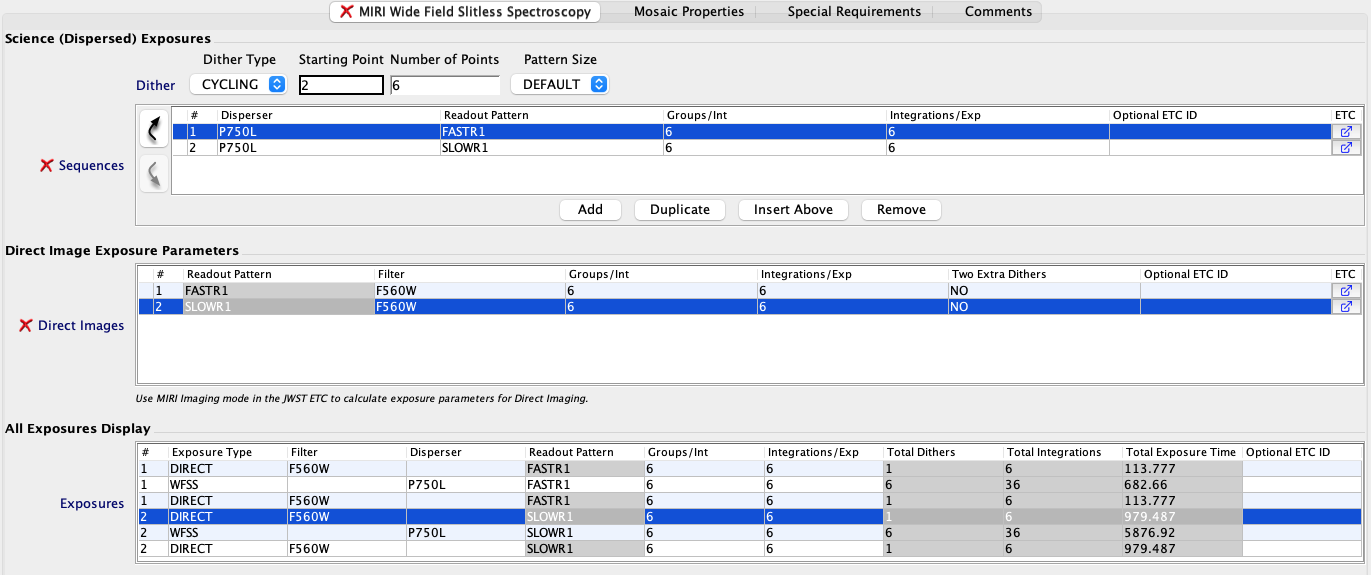
The All Exposures Display table at the bottom of the figure shows two sequences. Dispersed exposures are shown with Exposure Type "WFSS".
Disperser
DISPERSER=P750L
DISPERSER is the spectrographic element for the science observation. The P750L prism is the only disperser available.
Readout Pattern
READOUT PATTERN [READOUT PATTERN] = FASTR1, FASTGRPAVG8, SLOWR1
This field specifies the readout pattern to be used to obtain the data for all exposures in the sequence.
FASTGRPAVG8 is available for Cycle 6 proposals and later.
Number of Groups/Integration
NUMBER OF GROUPS/INTEGRATION [NGROUPS] specifies the number of groups in an integration.
Number of Integrations/Exposure
NUMBER OF INTEGRATIONS/EXPOSURE [NINTS] field specifies the number of times the integration is repeated. Allowed range is 1-100.
Direct Image Exposure Parameters
Each exposure sequence includes two direct images. One direct image is acquired before the dispersed exposure and one after.
- Initial Direct Image offset is the same as the first dither offset of the dispersed exposure
- Final Direct Image offset is the same as the last dither offset of the dispersed exposure
Direct Images
Specify the FILTER, NUMBER OF GROUPS/INTEGRATION, NUMBER OF INTEGRATIONS/EXPOSURE and TWO EXTRA DITHERS.
For more information on defining an exposure specification, see MIRI WFSS APT Template.
Direct Image Readout Pattern
The READOUT PATTERN specified for the dispersed exposure is used for both direct image exposures and may not be changed.
Filter
FILTER=F560W, F770W, F1000W, F1130W, F1280W, F1500W
Select the filter to be used for both Direct Image exposures. A filter may not be used in more than one sequence.
Direct Image Number of Groups/Integration
DIRECT IMAGE NUMBER OF GROUPS/INTEGRATION [NGROUPS] specifies the number of groups in a direct image integration.
Direct Image Number of Integrations/Exposure
DIRECT IMAGE NUMBER OF INTEGRATIONS/EXPOSURE [NINTS] field specifies the number of times the direct image integration is repeated within an exposure. Allowed range is 1-100.
Two Extra Dithers
TWO EXTRA DITHERS = NO (default), YES
Specifies two additional dithers added only to the direct image exposure following each dispersed exposure.